Sunday, December 16, 2012

The Science of Productivity.

Wednesday, August 22, 2012

Starter, Sustainer, or Finisher?

We recently packed up all of our things and made a cross-country move from Minnesota to California.  I will be the Senior Pastor of the San Luis Obispo Seventh-day Adventist Church and also have oversight of the Morro Bay SDA Church.  The people here are wonderful and I'm really looking forward to leading this exceptionally gifted church district!

I have been an expert at setting up systems for success at the beginning, making sure that the foundation is strong for the vision.

But I've heard it said that lots of people start well and that it's finishing well that really makes all the difference.

And at a recent leadership conference, Bill Hybels spoke about how a vision is most vulnerable in the middle (not the beginning or end).

So, what's most important?  Starting?  Sustaining?  Finishing?

All three are important!  And you must have people and processes in place to make sure all three get done.

When we were packing for our recent move, this came out clearly.  I had a vision for how the packing was supposed to go.  I was getting rid of things we didn't need, packing up the large things, and getting everything going so it would all fit in the PODs we rented.

But the closer we came to moving day, the less energy and vision I had.  When my brother and mother-in-law showed up to help, it was exactly what we needed to sustain all of the packing fervor.

The day before the move, I was basically shut down.  I no longer had any vision or energy for packing the small things and dealing with finishing well.  Thankfully, as I was shutting down on all of the detail things, my lovely wife was gearing up as she could see the finish line and see that things were now manageable.

In any project, you need to be sure you have people and processes in place to start well, sustain forward momentum, and finish well.  You need visionaries, workers, and managers to bring a project through to the end.

Are you a good starter?  A sustainer?  A finisher?  I'd love to hear your perspectives.


Labels: , , ,

Tuesday, September 14, 2010

Get-It-Done Guy's 9 Steps to Work Less and Do More


Today is a special day! Today is September 14, the date of the long-awaited release of the Get-It-Done Guy's book - 9 Steps to Work Less and Do More.

Think of this book as a VERY PRACTICAL 7 Habits for Highly Effective Hipsters.

Stever Robbins has a refreshing, fun, witty way of hitting each of his points home with clarity and practicality. Did I mention it's practical? Because you can actually take the steps he's advocating and transform your life's priorities and efficiencies.

I've only read a few chapters so far (you can get your sample chapters here - and also download some audio), but I'm definitely looking forward to reading the whole book.


Order Get-It-Done Guy's 9 Steps to Work Less and Do More on Amazon.com Today

Labels: , , , , , , , , , , ,

Monday, September 14, 2009

Spouses Working and Resting in Sync

Here's a novel concept:
  • Everything that benefits the family counts as work.
  • Both spouses "work" the same hours.
  • Both spouses STOP "working" at the same time.
  • Make a schedule and stick to it.
Let me tell you why this is such a novel concept for me.

I'm a half-time pastor (I work Tues, Thurs, half of Fri), a part-time web designer, and a half-time stay-at-home dad. My wife is a full-time teacher.

For the last couple of years, I've struggled with feeling "useful" because I'm just sitting at home half of the time. My wife struggles with feeling "useful" because she's not as involved in the life of the boy as she'd like to be.

As a stay-at-home parent, I can keep the house moderately clean, feed the boy, take him to gymnastics, and blow off any real interaction with him while I watch shows off the DVR and surf the web the rest of the day. There. I've done my part. Right?

Then, when my wife comes home (remember, she's actually been working all day), she rests while I'm putting supper on the table. Then I rest while she's doing more teacher stuff. Until it's time for her to go to bed, at which time I may do some web design or ministry stuff or Facebook.

This fragmented arrangement, where we work and rest out of sync with each other, has sometimes led to self-doubt about our usefulness, resentments about us-time v. me-time, some mild labor disputes about who's doing more, reinforcement of workaholic tendencies, etc.

Now, imagine we did something different.

When my wife leaves for work, I start "working." I do the dishes (with the boy). I tidy up (with the boy). I do laundry (with the boy). I school the boy. I play with the boy (actually focusing all my attention on him when I interact with him). I shop (with the boy). I work through my GTD lists. I do web design when he's napping. I fix meals (with the boy).

When my wife arrives home from work, she pitches in with supper and child-rearing. We both continue "working" at the home and family until the boy goes to bed...

Then? We're DONE!

The rest of the time is rest time... connecting time, tv time, internet time, pleasure reading time, whatever.

This arrangement honors the dignity of all the work being done (inside and outside the home). It resolves the labor disputes. It draws a clear line between life and work. It puts your connecting time in sync.

I gotta tell you... now that we're doing this, our house is a lot cleaner; the boy is happier; we both feel more useful; and we both connect better with each other when we're working together and resting together.

Would it work for you? How could it work if one partner worked nights? Could this be a first step to healing a fragmented life?

Labels: , , , , , ,

Friday, June 19, 2009

David Allen - 45 Minutes of GTD

Getting Things Done. 45 minutes of teaching from the master himself.

Labels: , , , , ,

Thursday, March 29, 2007

Fully Present - Fatherhood

One of the greatest gifts we can give to anyone is the gift of being "fully present."

You know the "fully present" person. He makes you feel like talking to you is the single-most important thing he could be doing right now. She makes you feel like everything you say is interesting. You feel heard. You feel valued. You feel... loved?

You know the other people, too. You're talking and they're glancing around. You're asking for input, and they make you repeat the question. They're looking at their watch, waiting for the next thing. Or they're nodding their heads, waiting for you to be quiet so they can make their point.

All too often, I'm one of the other people - I'm the one looking around, checking my watch, nodding my head, waiting for you to leave. I'm task-oriented, not people-oriented. And I've used that as an excuse long enough.

Last summer, we had a guy come over and give us a bid on sodding our front yard. I was the one at home taking care of my son. And the guy asks, "you got the babysitting duty today, huh?" I said, "yeah, I get to hang out with him in the afternoons."

The more I thought about what he had asked, the more rankled I got. I really should have blasted him: "I'm not babysitting. I'm fathering. I'm being a dad. I'm doing the single-most important thing I could be doing right now - spending meaningful time with my son. It's my singular focus to pass on my beliefs and values to the next generation, to help my son grow up into a mature, responsible, productive, godly man!"

But I didn't say any of those things. I only thought them later...

But over the last few months, I have come to realize that I have not been as "fully present" as I would like to be for my son. I have not been so fully engaged in the "single-most important thing I should be doing right now."

Too often, I'm content to plunk him down in front of the TV to watch Praise Baby! or Muzzy auf Deutsch (hey, they're inspirational and educational, right?). Or I'll spend an afternoon surfing the web (or writing this blog), hoping he doesn't bother me too much or require a great deal of my attention. He comes over to play, and I catch myself shrugging him off...

But I want to be "fully present." I don't want to be the (physically present) absentee father. I don't want to be another parenting statistic. So I've resolved to blog only when he's napping. I've decided to keep a @Play list of ideas for meaningful things we could do together.

How do you intentionally make yourself "fully present" for your kids?

Labels: , , , , , , ,

Tuesday, March 27, 2007

GTD - Ubiquitous Capture (doh!)

Merriam Webster's definition for ubiquitous:
Main Entry: ubiq·ui·tous
Pronunciation: yü-'bi-kw&-t&s
Function: adjective
: existing or being everywhere at the same time : constantly encountered : WIDESPREAD ubiquitous fashion>

Right. So up till now, I've been using the term "Ubiquitous Capture" to talk about the initial major collection (including the mindsweep) that dumps everything into my inbox for the first time. In other words, I've been using it incorrectly.

Thanks to Ben (of bathgates|dot|net) for clarifying my error. He writes:

I think 'anonymous' is right about ubiquitous. Allen's intent is that you always have the ability to capture information into your trusted system - everywhere - whether that's using HipsterPDA, a 'real' PDA, the back of your hand etc. If it doesn't go straight into your trusted system then, it at least gets captured. What you're talking about is a mindsweep.

Doh! To be fair, "Ubiquitous Capture" isn't even an official GTD term. David Allen only uses the term "ubiquitous" once in the book (on page 166). And only one article (by Robert Peake) on the davidco.com website uses the term "ubiquitous." Thus, the term "ubiquitous capture" must be an invention of the vast GTD blogging community.

Unfortunately, I cannot blame the blogging community for my mistake. The overwhelming evidence is abundantly clear:"Ubiquitous Capture" means having a voice recorder with me in my car, bathtub crayons in my shower, a pad of paper by my bed, and my PDA with me at all times. Sorry for leading anyone astray.

Labels: , , , , ,

Monday, March 5, 2007

Palm Syncing with Google Calendar

I got a comment on my last post (about having to tweak my calendar so it's no longer a block schedule):
Josue said...

You may want to use Google Calendar. Then set a primary calendar for your hard appointments and a secondary one for your blocks. They can be given different colors and you can hide or highlight them very easily at any time.

GTD is cool :) I just started implementing it 2 weeks ago and it has changed my work flow in an amazing way!

1. Way to go, Josue! Keep using GTD. The first month may be the hardest. But if you focus on the amazing results you're seeing, you will never want to go back!

2. But I use a Palm Pilot. And in searching online, I've only seen nasty, ugly, roundabout hacks to get Google Calendars to sync with a Palm Pilot. Most of them involve iCal, which I don't use because I used to have Palm Pilot and iCal syncing issues.

...

So this evening, my wife and I were enjoying some idle conversation, when I wistfully proclaimed, "I wish there were some good way to sync my Palm Pilot with Google Calendars. I got this great comment today... And I can have multiple calendars with one as my block schedule and one as my appointment calendar..."

My wife said, "Did you even check your del.icio.us links today?!"

Lo and behold! There it was. A link from my lovely wife to goosync.com. And it looks like it actually will sync my Palm Pilot with Google Calendar! There's a free version and a subscription version. I'll have to see how well I like the free version before I go throwing money at anything.

I'll let you know what I come up with.

I'm not really tied to MSOutlook anyway, because I'm only a MSWindows person at work. And my work situation is changing... And I really doubt I'll ever have to use a PC again. Am I rambling?

P.S. Thanks for the tip, Josue! Thanks for the heads up, wife.

P.P.S. Did everyone else already know that you could sync Google Calendars with a Palm Pilot? Am I the last one to know these things?

Labels: , , , ,

Wednesday, February 21, 2007

How to Get Out of a Conversation

Have you ever been in a conversation that you really needed to get out of? And you just couldn't figure out how to end it?

Maybe you have some place to go, someone to call, or the conversation is just going nowhere and you have to get on with your job.... Maybe a church member is monopolizing your time when you really need to be talking with a visitor.

Here's what to do:
  1. Startle.
  2. Say, "Oh, thank you for reminding me! I need to... [something else]"
  3. (It doesn't have to be related to anything they actually said)
  4. Do that something else (call someone, leave, get out some papers... anything).

Their presence and their conversation did remind you that you needed to be doing something (anything) else. And they feel good about helping to remind you of something important.


Note: This only works a few times with the same person.
Note 2: Don't try it with someone who has read this post.
Note 3: If you don't really have anything better to do, don't be a jerk.

Labels: , , , ,

Tuesday, February 20, 2007

The Amazing Expanding Project

Here's a time management principle: Projects will naturally expand to fill all of the time we dare to give them.

If you set aside 20 hours of your work-week to spend on your sermon, your sermon will be more than happy to use up all of that time. Because you have allotted so much time, 1) there's no sense of urgency, so you're more likely to procrastinate; 2) you'll spend a lot of time on a turn of phrase, an illustration, or finding graphics (all nice things, but really worth the time?). And you'll wonder why you have no time left for your ministry, your spiritual life, your friendships, your reading, or your family.

If you are a preaching pastor in a multi-staff church, 20 hours worth of prep may be the exact right thing for you to be doing with your week. But if you are a lone pastor in a smaller church, there's ministry to be done.

So I suggest that you short-schedule yourself on major projects so you won't waste time. If you set aside 6 hours for your sermon, it may take 7 or 8. You may go over, but you won't have wasted all of that time doing unnecessary things.

You work better under pressure, anyway. Don't you?

So, there's my Time Management Tip for the Day: Short-schedule your projects so they don't gobble up your life.

(Don't worry, I'll do a post later about building margin into your schedule. Just for balance.)

Labels: , , , , , , , ,

Tuesday, February 13, 2007

Getting Things Done - Shower Power

Bathtub Crayons to Capture Ideas in the ShowerI just got back from Toys "R" US!

I bought crayons!

Something nice for my son's upcoming birthday? No. For me. For GTD.

I wrote previously about how I had a bunch of ideas in the shower and didn't have a good way to capture them. Pascal Venier left me a link to "A Shower of Ideas". He had a phone (for voice memos), a white board, a note pad, and pens. But nothing really for recording thoughts IN the shower.

Did you know Crayola makes "Bathtub Crayons?" Now I can mindmap a sermon series right in the shower! Imagine all of the tiles as a big wall of graph paper... And it all wipes away when you wash it off.

Now I can finally capture everything everywhere. And I can write love notes to my wife.

Labels: , , , ,

Getting Things Done - Car Capturing

Last week, I posted about not capturing my ideas. One of my biggest issues was not capturing thoughts, ideas, and to-dos while in the car. I can't write while driving and I don't have a voice memo recorder.

Veggiegrrl left a useful comment:
I use my cell phone to call and leave a message on my voicemail at work. Then I don't have to remember to retrieve anything from the car -- it's waiting at my desk when I get there.

Since then, I've called maybe 15 capture items in during my drive time. Problem solved! No more lost ideas! Thanks, Veggiegrrl!

Labels: , , , ,

Friday, February 9, 2007

Present a Rough-[almost final]-Draft

Because churches are volunteer organizations, and because they are run by committee, and because the church will be there long after you leave - you NEED buy-in. In fact, buy-in may be one of the most important commodities in a congregation. If there's no buy-in, you're just spinning your tires.

As a young pastor, I wanted to look professional in front of my board. I wanted them to believe me and trust me. I wanted them to like my proposals and vote them unanimously!

And it worked. They trusted me. They believed I had thought through all the issues in advance. They liked my proposals. And they voted them through unanimously!

But there was a problem. No buy-in. My early proposals were so slick, so convincing that they actually prevented me from getting buy-in. They liked the idea; they voted it through. But nobody else had wrestled with it. Nobody had made it their own. Nobody else was willing to go out on a limb to actually make it happen.

So here's my little lifehack for getting buy-in in meetings. It's not an efficient way of ramming through your agenda, but it is an effective way of getting collaboration and buy-in. It doesn't look terribly professional, but it works.

When you're about to make a proposal, create a document that is your best work. Then mark it up, cross something out, and make notes on the sides. Copy that and hand it out. People will see it as a work in progress - a rough draft. They'll read what you've crossed out. They'll automatically start brainstorming with you toward a better idea. They'll automatically assume ownership.

Poof! It becomes theirs. It becomes collaborative. Buy-in has been achieved.

Labels: , , , ,

Wednesday, February 7, 2007

Some of My Best Thinking Happens in the Shower

I don't always capture all of my ideas, projects, actions, and must-dos. There. I admitted it for all the world to see.

I found myself just this morning obsessing about going to the office and setting up the PowerPoint Projector (our old one died last week). So I went to the office and set it up. When I went to cross it off my project list... it wasn't there. Huh. Maybe that's why I had been obsessing about it.

The funny thing is, I've needed to set the projector up all week. And I've even been reminded multiple times. One time, I was reminded while sitting at my desk (right in front of my blank paper and my inbox and my PalmPilot!).

Why didn't I write it down and put it in my inbox (at the very least)?

Do I not trust my GTD system?

Do I really think it will do better rattling around in my head all week? I mean, that's just begging for me to forget about it and panic when I finally do remember at a later time.

I even did a great system review this Monday. I trust my system...

Maybe even after 8 months of GTD, it still isn't an automatic habit to write things down.

I have great ideas all the time that I don't write down. Usually when I'm in the shower or when I'm driving. I suppose I can get a voice memo recorder for when I'm driving (even though I do drive a stick).

Any suggestions for what to do about my ideas in the shower?

Over on the GTD forum, there's a thread about whiteboards. Gtderik says that he keeps a dry erase marker in his bathroom to make notes on the mirror:
I actually stole the idea from Jason Womack, but I have kept a dry erase pen (with magnetic tip to stick to the framing) in my bathroom. the mirror in the bathroom has become a great place for capture and placeholding for me... I tend to have lots of ideas but are fast to disappear.... so even while shaving i can scribble some notes to myself... in the mornings I often get a waterfall of things that bubble to the surface...the mirror has also become a makeshift @spouse list as well to communicate if I get in late and she is already in bed...

Any other ideas?

Labels: , , , ,

Thursday, February 1, 2007

Debut of My GTD Portable Inbox (ok, it's just a manila envelope)

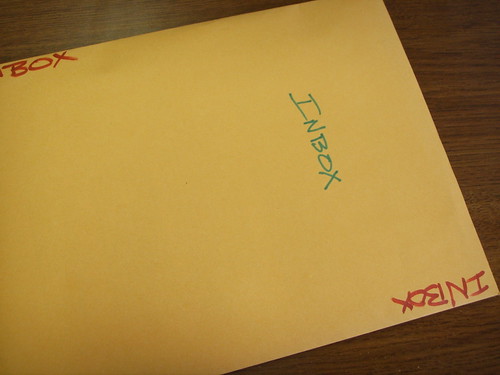
My Portable GTD InboxI just got back from a business trip. And this is my inbox!

The GTD paradigm has changed my life. But until this week, it all fell apart when I went on trips.

I have gone on at least 5 business trips and 5 personal trips since starting GTD in May of 2006. And every time I got back from a trip, I would have to find all of my receipts (pockets, wallet, backpack, car?), my notes, business cards, ideas, to-dos, etc. and kind of start GTD-ing all over again from scratch (well, not quite scratch).

Before going on this trip, I commandeered David Allen's own personal Travel Checklist (and changed it around to meet my needs and possessions, of course). On the list of items to pack, David had his in-tray. I chuckled a little at first, thinking about packing my black plastic stackable in-tray.

But it made sense. The reason GTD had always fallen apart on trips was that I had no good on-the-fly collection system. So I got a manila envelope, wrote "INBOX" on it in big letters, and put it in my briefcase. I also put in a pad of paper for brain-dumping.

The results were very satisfying. And there was no glitch in my system this time. And everything was in one place. And I got things done. Ahh.

Labels: , , , ,

Sunday, January 28, 2007

The Perfect GTD App - My Top 5 List

Here are the top 5 features I would want in a Perfect GTD App (this assumes, of course, that the app already does all the GTD basics):
1. Cross-Platform Conformity - I would want it to run on my PC (office), Macs (home), the Internet (anywhere), my Palm Pilot or Pocket PC (without an internet connection), and have printout options for my Moleskine. I would want the interface to be completely consistent between the platforms and have the platforms fully sync-able.

2. Teams Capability - I want to be able to place things in my team-members' inboxes and allow them to put things in mine. I might want to be able to share my project list or someday/maybe list with them. GTD as a team can be very powerful.

3. Project/Task Reconciliation - I want to be able to see my Project and Task Lists side-by-side (as it is now, I have to print out my projects to reconcile with my tasks during my weekly review). It would be really cool if a Project entry turned red if there were no Task assigned to it. It would also be cool if you could hover or right-click on an entry and see what else (task, project, file, date, etc.) was associated with it.

4. Wizard Functionality - I would like wizards to lead the user through the initial capture and set-up process, to teach the user workflow, and to lead the user through a weekly review process. These wizards could be user-customizable (for the weekly review, for instance).

5. High-Level Enabling - I don't want the Perfect GTD App to be just about the runway-level things. This is similar to the wizard functionality. I would love to have modules for visioneering, for long- and short-term goal setting, for strategic planning, for big-picture thinking, for accountability (see #2) and for work-and-life balance.

That's my top 5 list for the Perfect GTD App. Let me know when you write one.

Labels: , , , ,

Thursday, January 25, 2007

My GTD Loves ReDo - List Software for the Palm Pilot

ReDo solves a major problem with the ToDo list function in my Palm Pilot - recurring tasks.

With ReDo, I just put a recurring task in once, decide how often I want it to show up in my ToDo list, decide which list I want it to go into, and forget about it. It's kind of like a tickler file for my task lists.

When I started using ReDo, I would put projects in it. But I don't do that any more. It just never worked out well. So now I only put in recurring tasks (click for a discussion of projects vs. tasks).

One of the ways I use this as a pastor is to keep up with my different ministry teams. Each month, I want to touch base with each of the leaders of the church's different ministry teams. So I have them scheduled in ReDo to show up one per weekday in my ToDo list (in the @Call category) starting at the beginning of each month.

I also use it to put "devotional and prayer" into my @Office list every day.

It's well worth the small price (maybe I'll register my copy someday).

Labels: , , , ,

Friday, January 19, 2007

Getting Things Done - The Perfect GTD App

Darren J Paine has just started Getting Things Done. Hurray for Darren! But wait. He is starting to fall into the trap of the quest for the perfect GTD app (very similar to the search for the Holy Grail or Pellinore's hunt for the Questing Beast). He writes:
i am looking for a simple application that will help with the GTD process. there is about 247 “solutions” out there, some are online versions, others offline, most for windows, and some good ones for my apple mac world. trying to winnow out the wheat from the chaff with these app’s is tricky. some cost big bucks {big bucks for a broke photographer like me} others are free. some look like it will take weeks just to learn how to use the app, others look even harder!

The search for a perfect GTD app is a trap. I see a bunch of blog sites reviewing, using, and discontinuing use of GTD apps like it’s the whole point of GTD. I use my PalmPilot and some files. My wife uses paper. Use whatever you have. The beauty of GTD is that it’s a process (almost a way of thinking more than anything) that you can apply to whatever tools you have on hand.

In your search for the perfect app, you’ll be disappointed that it doesn’t do {fill in the blank}. And then you’ll try a different app. And you’ll get so bogged down with trying to find the right tools that you’ll never really use GTD (or it will take over your life and GTD will be the end instead of the means).

Abandon all hope of the perfect app…

A very nice blogger (let's call him Brett) responded to Darren's plea for the perfect app:

I’m going to send Darren his very own Hipster PDA (and I’ll even include a fancy Pilot G-2 mini, my pen of choice if my Fisher Bullet goes missing).

In case Darren doesn't know, a Hipster PDA is some index cards and a binder clip. Brett says if you can't use the system in analog, you probably can't use it digital either.

I agree.


Labels: , , , , ,

Thursday, January 18, 2007

Getting Things Done - Tickler File

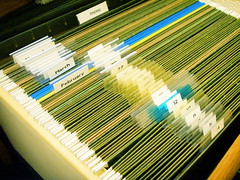
GTD Tickler File (January 4)One of the best "tips n tricks" I got from David Allen's book Getting Things Done was the tickler file. Here's a picture of mine. The tickler file is a filing calendar consisting of 43 file folders - 12 monthly and 31 daily folders. The tickler file is such a phenomenal productivity tool, there's even a blog called 43folders.com that talks a lot about GTD implementation.

It takes me only a few seconds every day to check my tickler file and "tickle" my memory about what's on the agenda for the day. Maybe you have recurring things that need to be done every week (or month, or quarter). You can put a reminder in your tickler file and be absolutely certain you'll be reminded at exactly the right time. Then you can forget about it and stop worrying.

The strength of the tickler file is its ability to include existing physical items in your calendar. In the last 6 months, I've put all sorts of things in my tickler file - airline reservations, conference and travel information, birthday reminders, my weekly review checklist, blank thank-you notes, appointments, mail I need to respond to, date plans for my anniversary, articles to read, my daily worker's report, etc. At home, it's a great way to organize your bills.

Here's a link to David Allen's article about how to set up your own tickler file (you'll have to create a profile and they'll email the file to you for free). Here's a link to the 43Folders wiki article about the tickler file.

Labels: , , , ,

Wednesday, January 17, 2007

Getting Things Done - Office Supplies

Anybody else have a fetish for office supplies? (Sometimes I just go into the office supplies store to unwind. I look at pens and paper, software and routers, office furniture and PalmPilots. Do you know how many different Avery labels there are??) So when I learned I would need office supplies to process my inbox (see my previous post), I was really excited. Here's a list of the office supplies you'll need to start the Getting Things Done process.

Remember, you are dealing with paper. So you need proper paper-handling supplies. You can get all of these at the GTD Supplies section of the Juggling Sheep Bookstore.

First, you need an inbox. I have a couple of these. I keep the inbox on top and a tray underneath for my paper (you need paper for the daily brain-dump). That's why I like the ones open on one side, so I can just slide a piece of paper out.

Second, you need file folders. You can get hanging ones or standing ones (David Allen makes some kind of a case for standing ones). It turns out you actually have to file stuff for future reference.

Third, you need a desktop labeler. You will use this to label your file folders. Believe me, there's something about getting a labeler that will make you want to file. Maybe it's the new technology that you want to play with, or maybe it's the fact that your files look so professional... Oh, yeah. Buy some extra labeling tape, too. You'll probably need it.

The rest of the stuff you probably already have - a stapler, paper clips, assorted sizes of binder clips, and a tape dispenser. (We had to buy a filing cabinet at home).

There. Now you've got all your stuff. Ready to start processing the inbox?

Not quite. I guess you'll need some kind of calendar (doesn't matter what kind) and 43 file folders for a "tickler file" (I didn't make up the name). Maybe the next post will be about my tickler file (I want to help you procrastinate as long as possible before processing your inbox).

Labels: , , , ,