The Science of Productivity.
posted by Jay at
5:31 PM
0 Comments


Personal Productivity for Pastors
 First, I read the Bible with You Version (FREE). The iPhone app still isn't what I'd like it to be. I want to easily highlight specific words or multiple verses. I want to be able to take notes and make comments in an intuitive way. But, I can read the Bible, in the version of my choosing (except there's no Greek or Hebrew!) wherever I want. I can download Bible versions to reside on my iPhone, so I can read scripture even when I don't have a wireless signal. I can highlight the things that jump out at me. I can quickly find specific text references. I can use the nifty read-through-the-Bible-in-a-year function to tell me what part of the Holy Scriptures God should be speaking through today (just kidding).
 Second, I now use Kindle for iPhone (FREE). Just download the free app onto your iPhone, buy Kindle books at Amazon.com, and *POOF* they show up on your iPhone. I've found the Kindle app to be intuitive. I can highlight, make notes, copy and paste into other applications... And my notes and highlights are sync'd with all my other Kindle devices (umm... I don't actually have any others. I'm just sayin' I could if I did.).
Labels: Gadgets, GTD, Reading, Software, Spiritual Life, Time Management, Tips n Tricks
posted by Jay at
10:15 AM
4 Comments
Labels: Balance, Family, GTD, Lifehacks, Personal Life, Time Management, Values
posted by Jay at
10:51 AM
5 Comments
Labels: Balance, GTD, Lifehacks, Processes, Time Management, Tips n Tricks
posted by Jay at
3:36 PM
0 Comments
"While you can think in terms of efficiency in dealing with time, a principle-centered person thinks in terms of effectiveness in dealing with people.”I've too often made the mistake of trying to be efficient with people... putting the end results first or trying to make facetime as brief (i.e. efficient) as possible. Someone walks up to my desk to talk (about something actually important) and I've thought that I can "listen," check my e-mail, file papers, give "obvious" (duh!) answers, and still be effective. Um... no. Notsomuch.
Labels: Balance, GTD, Leadership, Personal Life, Priorities, Time Management, Values
posted by Jay at
9:12 AM
3 Comments
Labels: GTD
posted by Jay at
5:37 AM
2 Comments
Labels: Church Planting, GTD, Meetings, Personal Life, Priorities, Retreat, Spiritual Life, Values
posted by Jay at
1:39 AM
0 Comments
Labels: Balance, Church Planting, GTD, Personal Life, Priorities, Time Management
posted by Jay at
8:51 PM
1 Comments
Labels: Family, GTD, Personal Life, Spiritual Life, Time Management, Tips n Tricks
posted by Jay at
8:25 AM
2 Comments
Labels: Balance, Family, GTD, Lifehacks, Personal Life, Priorities, Tips n Tricks, Values
posted by Jay at
1:55 PM
17 Comments
Main Entry: ubiq·ui·tous
Pronunciation: yü-'bi-kw&-t&s
Function: adjective
: existing or being everywhere at the same time : constantly encountered : WIDESPREAD ubiquitous fashion>
Right. So up till now, I've been using the term "Ubiquitous Capture" to talk about the initial major collection (including the mindsweep) that dumps everything into my inbox for the first time. In other words, I've been using it incorrectly.
Thanks to Ben (of bathgates|dot|net) for clarifying my error. He writes:
I think 'anonymous' is right about ubiquitous. Allen's intent is that you always have the ability to capture information into your trusted system - everywhere - whether that's using HipsterPDA, a 'real' PDA, the back of your hand etc. If it doesn't go straight into your trusted system then, it at least gets captured. What you're talking about is a mindsweep.
Doh! To be fair, "Ubiquitous Capture" isn't even an official GTD term. David Allen only uses the term "ubiquitous" once in the book (on page 166). And only one article (by Robert Peake) on the davidco.com website uses the term "ubiquitous." Thus, the term "ubiquitous capture" must be an invention of the vast GTD blogging community.
Unfortunately, I cannot blame the blogging community for my mistake. The overwhelming evidence is abundantly clear:"Ubiquitous Capture" means having a voice recorder with me in my car, bathtub crayons in my shower, a pad of paper by my bed, and my PDA with me at all times. Sorry for leading anyone astray.
Labels: Accountability, Corrections, GTD, Lifehacks, Time Management, Tips n Tricks
posted by Jay at
1:15 PM
7 Comments
So now comes the inevitable question: GTD is just keeping lists?
Um… Yes. And no.
Before I started using David Allen’s Getting Things Done methodology for personal productivity, I had made plenty of “to do” lists. And they didn’t really help. And, in some cases, the “to do” lists even sank me deeper into paralysis and procrastination. What was wrong with my “to do” lists?
The first problem with my previous “to do” lists was how incomplete they were.
I would only list 5-10 priorities I needed to do. Obviously there was a ton more of stuff that I needed to (or could) get done. But the lists weren’t based on a ubiquitous capture - everything in my life on lists.
The first major genius of GTD Lists is that they’re based on a ubiquitous capture.
The second problem with my previous “to do” lists was that they weren’t “Next Action Lists.” My list would look like this:
As you can see, a couple of these are Next Actions (”pick up dry cleaning” and “call babysitter”). But most of them are Projects (multi-step processes). And strictly speaking, you can’t do a Project. You can only do a Next Action related to the Project (edging that project toward completion).
So my list says “Sermon.” And I think I know what that means… But if I haven’t defined what my next physical action is, I think of the whole blessed thing that has to get done. And I’m paralyzed by the sheer magnitude. If I haven’t defined a next action, I can’t take a next action.
I need to repair my roof. But where do I start? If I haven’t defined a next action, I don’t know how to repair my roof. So I spend 30 seconds thinking… What is the next action I need to take to move this Project along? I guess I need to get a roofer recommendation from my friend Harold. So calling Harold is my next step.
So keeping your Project List separate from your Next Action List is the second major genius of GTD Lists.
The third problem with my previous “to do” lists was that I never looked at my list at the right time.
I would have home things and work things and store things and phone things and computer things all on the same list.
GTD teaches us to keep “contextualized” Next Action Lists. This way, I only look at the lists that are relevant to the context I find myself in. So I keep several different lists:
@Agendas
@Anywhere
@Call
@Computer
@Errands
@Home
@Office
@Prayer
@Reading
Waiting For
Borrowing
Lent Out
Projects
Someday/Maybe
Believe it or not, I actually have things on every one of these lists. My entire life is on lists. Some of the lists (waiting for, borrowing, lent out, someday/maybe) I only look at during the weekly review. If I’m at the office, I just keep out my @Office list, my @Call list, and my @Computer list and work off of them. But if I’m at home, I have my @Home, my @Computer, and my @Call list out. If I’m out and about, I have my @Errands list out.
Contextualized Lists are the third major genius of GTD Lists.
The fourth problem with my previous “to do” lists was how I decided what to do. I used to try to decide based on “priority,” whether that priority was realistic or not.
GTD teaches a 4 step process to decide what to do at any given time, ever. Decide what to do right now based on the following criteria (in rank order):
You look at the contextualized lists appropriate to where you are.
You look at your calendar and say, “How much time do I have available right now?“ Depending on your answer, there are just some Next Actions you don’t have time to do now.
Then you ask, “How much (emotional/mental/spiritual/physical) energy do I have right now?“ Maybe you have enough mental energy right now to shoot off a few emails, but not enough to write that newsletter article. Maybe you have enough emotional energy right now to deal with that insurance claim, but not enough to deal with that cranky member.
When you’ve figured out how much time and energy you have, ask, “What’s left on my list that will give me the biggest payoff for my time (for God’s kingdom) right now?“ Do that next action.
And if you go through this process, you can be fairly certain all of the time that the thing you’re doing right now is exactly the thing that you need to be doing right now.
Deciding what to do and when to do it is the fourth major genius of GTD lists.
I’m sure there are more, but I don’t have enough mental energy to keep writing…
————–
Jay Perry wishes his wife would come home from that professional conference she’s at.
Labels: GTD, Processes, Time Management, Tips n Tricks
posted by Jay at
8:40 PM
1 Comments
The secret to being organized and efficient (in anything we do) is to have an established workflow. Think about it: You probably shower the exact same way every morning. Don’t you? And then when you get out of the shower, you probably dry off in exactly the same way you dried off yesterday - face first, hair, wrap the towel around your back, etc. And because it’s so routine, you don’t even think about it.
The core of Getting Things Done is establishing a workflow. How do you deal with everything you need to do (or think about or plan)? Unfortunately, many of us are trying to make it up on the fly. Someone hands me a piece of paper. What do I do with it? - pocket, notebook, drawer, desk, backpack, file, trash? A church member wants me to send him that article about fasting. Do I think I’ll just remember to do it? Do I make a note to myself? What do I do with that note?
The Getting Things Done workflow will teach you how to deal with everything in your inbox. There are several GTD workflow charts that you can print out to help you learn to process and organize all of the stuff you’ve collected. I put one up on the wall right next to my desk before I even tried to tackle my overflowing inbox. I really like David Allen’s original workflow diagram. The D*I*Y Planner website also has a diagram that I like (especially because it includes some detail on the ubiquitous capture and a checklist for the weekly review).
Currently, I have a desktop wallpaper from anabubula.com on my laptop. Now, every time I open my computer, I see a lovely GTD reference flowchart. Here’s a sample:
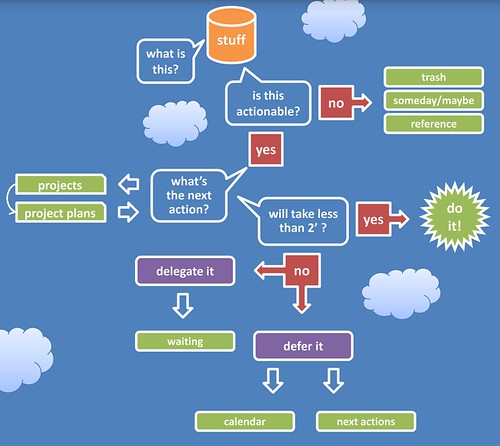
Let’s just talk through the GTD workflow using this diagram, shall we?
Every idea, article, appointment request, piece of mail starts out in your inbox.
You pick it up. You ask, “What is this? Is it actionable?”
If it’s not something you can or should act on right now, you have three options - 1) throw it away, 2) save it for future reference (file it), or 3) decide to maybe deal with it some other time (write it on your someday/maybe list or throw it in your tickler file). Literally 75% of my first ubiquitous capture was unactionable. I either threw it away or filed it. Hurray!
If it is actionable, ask yourself, “Can I do this in two minutes or less?“ If you can, do it now (p.s. phone calls usually take more than two minutes if you have to speak with a human being).
If it will take more than two minutes, ask yourself, “Is this a project or a task?“ A task means it will take only one physical action to complete it. A project means it will take two or more physical actions to complete it (look up the phone number and then call - two steps).
If it’s a task write it on your Next Action List.
If it’s a project, write it on your Project List. Then ask, “What’s the next action?“ Write that next action on your Next Action List.
Can you do that Next Action within two minutes? If you can, do it.
If you can’t do that Next Action in less than two minutes, ask, “Am I the best person to do this?“ If you’re not, figure out who is and delegate it. Write a reminder on your Waiting For List.
If you are the best person to do it, ask, “Does this *have* to be done at or by a certain time?“ If the answer is yes, write it on your calendar.
If the answer is no, just leave it on your Next Action List to do whenever you can.
And that’s the GTD Workflow. Now you know how to deal with absolutely everything life throws at you. The process will take a little getting used to on the front end, but after you do it for a while, it will be as natural as toweling off after your morning shower.
—————-
Jay Perry likes to say foreign words that he hears on NPR. Jalalabad! He writes Juggling Sheep, a blog about time management and personal productivity for pastors. Juggling Sheep receives several hits every week by people looking for actual information about how to actually care for actual sheep. Um, no.
Labels: GTD, Processes, Time Management, Tips n Tricks
posted by Jay at
3:03 PM
2 Comments
Here’s my quick startup guide to Getting Things Done:
1. Buy David Allen’s Getting Things Done - You will need your own copy. You can’t just check this out from the library and read it once. It will become a reference work that you will go back to several times as you implement and hone your organizational workflow.
2. Set Up a Working Work Area - This means having a trash can, an inbox, a file cabinet, file folders, a labeler, a stapler, scratch paper, binder clips, paper clips, scissors, tape, etc. You will be processing paper. Make sure you are set up to deal well with paper. (Shameless plug: you can buy all of those items at the Juggling Sheep bookstore.)
3. Do a “Ubiquitous Capture” - Capture everything that needs to be processed. This is a daunting and scary project. It means collecting everything in your home or office that needs to be dealt with - books to return or read or throw away, receipts, articles, tapes, DVDs, notes, magazines, board minutes, junk, mail, junkmail, etc. And that’s just the physical stuff. Then you capture everything in your brain (one thought per piece of paper) - ideas, plans, hopes, dreams, unfinished business, appointments, commitments, responsibilities, etc. Put all of these collected things into your “inbox” (note: when I was done with the capture, I literally had two four-foot tall stacks that needed to be processed - 8 feet of junk and stuff and ideas - no wonder I had felt like I was drowning). To read more about my initial ubiquitous capture, click here.
4. Process Your “Inbox” - This is a dauntinger and scarier project. Take everything out of your inbox, one item at a time. Figure out what it is. Decide what to do with it. (I will write more about how to process your inbox later this week.) Eventually it will end up in one of 8 places:
1) Trash
2) Someday/Maybe List
3) Reference (filing cabinet or bookshelf)
4) Project List
5) Project Plan (file or paper)
6) Waiting List (if you’ve delegated it or have to wait for someone else to act)
7) Calendar
8) Contextualized Next Action Lists (the very next physical action for each project)
5. Crank Widgets - Work the system. Keep the appointments on your calendar. Write multi-step projects on your project list. Put next actions on your contextualized next action lists. Do your next actions. Process your inbox every day. Follow up on your “waiting” list. Get Things Done.
6. Do a Full System Review Once a Week - Look at your calendar. Look at your projects and make sure you have a next action for each one. Make sure your next actions are up to date. Do another mini-ubiquitous capture. Empty your brain onto paper again. Do bigger-picture thinking (roles and goals). As a pastor (working toward the weekend), I do my weekly review on Monday.
And those are the very basics of Getting Things Done. It doesn’t need to be complicated. It just needs to be leak-proof so you will learn to trust it. That’s why you quit using every other time management system you’ve ever tried. You didn’t trust it because 1) it didn’t contain everything, 2) you didn’t review it enough to make it leak-proof. Now you know.
Labels: GTD, Processes, Time Management, Tips n Tricks
posted by Jay at
4:08 PM
10 Comments

As pastors, we should be caring mostly about higher-level stuff - seeing God’s vision for our churches, understanding our unique calling, roles and goals, balance, priorities, meaning, and purpose. We should be reaching our communities with the undeniably attractive gospel and a unique message for these last days.
But I think a huge barrier to understanding and implementing the “higher-level” stuff is the clutter we carry around in our heads every day. I was once told that pastors basically get paid to carry the details and needs of the church around in their heads 24/7/365. That made sense to me. It made sense because it resonated with my experience.
David Allen, in his book Getting Things Done, talks about all of the little things we have to do every day as the “runway” things. They are the current reality of things on the ground. Most of us never see things from “10,000 feet,” “20,000 feet,” or “30,000 feet” because we have so much clutter on the runway that we can never really take off.
That clutter on the runway is the same clutter in your brain that you carry around 24/7/365. You reason, “if I don’t think about it all the time, who will?”
The beauty of the Getting Things Done process is that it captures all of those things - duties, expectations, goals, appointments, plans, projects, tasks, hopes and dreams - into a leak-proof organizational system that you can trust completely.
If you know the organizational system will remind you of everything you need to know exactly when you need to know it, you can take it out of your brain and stop worrying about it all the time. Your stress level (and blood pressure) will go down. You’ll quit being constantly overwhelmed by all of the “stuff” you have to deal with. And you’ll be able to think about the more important, “higher-level” things.
David Allen (borrowing a zen image) refers to this sense of peace as having a “mind like water.” Just like water in a pond, your mind should be at peace most of the time. And it should only react when something is thrown into it. Water reacts exactly in proportion to the object thrown into it - with a big splash for a big rock, or a little ripple for a small pebble. And when the reaction is over, it goes back to a state of peace.
If we all had a “mind like water,” I believe we would be better able to listen for God’s voice, discern His leading, do better strategic planning, truly enter into a Sabbath rest, and ultimately become the pastors God wants us to be. So before you can really get into the “higher-level” stuff, you need to really learn to manage all of the “runway” stuff.
You do that by getting all of your open loops out of your head and onto lists, where you can see, analyze, plan, and do them.
------------------
This week I'm guest blogging over at JustPastors.com. They've asked me to write about Time Management for Clergy - specifically GTD. This entry is from that series (even though some of the information is a repeat of what I've written here previously).
Labels: Calling, GTD, Priorities, Processes, Time Management
posted by Jay at
2:06 PM
0 Comments
And pastors are caught in the middle. There’s no agreed-upon job description for a pastor. So some pastors hide out and don’t do anything. Other pastors work so hard to please everyone that they end up losing their family, their sanity, or their sobriety.
A pastor has a lot of things to juggle - meetings, sermons, strategic planning, administration, training, evangelism, family, prayer, study, visitation, sudoku… Who has time for everything??!
The pastor needs to become an expert in time management and workflow, in order to get the low-level things done and make room for the more important things in ministry. Here’s a bit of my time management journey.
My supervising pastor (when I was an intern) had me keep all of my appointments in a calendar I kept with me all the time. I really think that was my first step to becoming organized.
Then I read Stephen Covey’s Personal Management Classic Seven Habits of Highly Effective People, and realized that I needed to do the important things instead of just the urgent things. I picked up some tips and tricks about designing weekly roles and goals. And that helped me to say “yes” to the best things by saying “no” to other good things.
I read all of Kenneth Blanchard’s One Minute Manager books, finding The One Minute Manager Meets the Monkey to be particularly helpful for empowering others, delegating tasks, and not micromanaging. I developed a set of “One Minute Goals” to keep me on track with my real priorities. All of these things helped me to focus more energy and time on mission-critical concerns.
Even though I had read some major personal productivity books, used a calendar and a day planner system, I was still disorganized.
A new PalmPilot helped me for a while (because it would beep at me, telling me when I needed to do the next thing). But frankly, I quit paying attention to the beeps and then I quit using it. And important ministry needs still slipped through the cracks.
My office was a mess. I had a paper inbox that was piled 8 inches high with articles, board minutes, mail, catalogs, etc. And I didn’t have a working filing system.
I constantly felt guilty. I was stressed out. It seemed like I couldn’t even keep up with myself, let alone the 50 or 60 families I was supposed to be shepherding spiritually. Every time the phone would ring, I’d get a sinking feeling of paranoia - just hoping it wasn’t someone I’d forgotten an appointment with (or someone asking me to help with something else). And the overload paralyzed me.
So we created ministry teams in the church and started writing procedures for everything the church did on a regular basis (thanks to 18 months of personalized coaching from the the Ministry Advantage Pastor’s Coaching System). It freed up my time, but it turns out “needing more time” wasn’t really the problem. I still felt guilty and paranoid about the things falling through the cracks in my ministry.
I turned a major corner about nine months ago when my wife gave me David Allen’s book, Getting Things Done (GTD). It is subtitled “The Art of Stress-Free Productivity.” It promised a “mind like water.” Before reading “Getting Things Done,” I had never been able to successfully use a productivity system (lists, PalmPilot, calendar, roles & goals, etc.) for more than a month or so before everything fell apart.
This book has truly revolutionized my ministry. GTD is not some expensive program or difficult new skill set. It’s merely a set of principles that integrate skills you already have (filing, making appointments, writing lists, etc.) into a seamless workflow of personal productivity and organization. You can use it at work or at home. You can use it with hi-tech PDAs or lo-tech paper planners.
Now I’m stress-free. Really. I remember all of my appointments. I turn in my worker’s reports on time (much to the amazement of my conference officials). I am productive when I’m at work. I’m doing better at making time for the important things like family and spiritual development. And I have a better sense of balance and priorities, helping me to see the big picture and do more effective strategic planning.
Over this next week, I’ll be writing about “Getting Things Done” for pastors. I’ve really come to see this as a major stewardship issue. Pastors must learn to master time just to keep up with mundane ministry tasks. If you’re not doing that, you can’t even begin to be faithful to the bigger picture visions and plans that God has in store for you.
Labels: Balance, GTD, Meetings, Priorities, Processes, Time Management
posted by Jay at
9:49 PM
0 Comments
As a 4-month newbie to GTD, I want to ask how do you find time/ make time/ plug
in time to get the reading done you need (even with executive summaries)? It is
my #1 frustration in ministry. (OK, that may be an exaggeration, but it is up
there AMONG the top frustrations in ministry).
Making time for reading is one of those Quadrant 2 things that we're just going to have to intentionally make time for. It's not urgent (it's not screaming at you, begging for attention), but it is important (if you want to continue growing, leading, and thinking).
I used to read 50-70 books a year (not book summaries. books). But then we bought a TV. And then we had kids. And then I started blogging. So now I'm down to about 20 books and 20-40 book summaries per year.
The whole trick to making Q2 work? Make the hard decision up front to replace something less important (American Idol?) or something urgent/not-important (interruptions, junkmail, too-frequent email, phone calls, some meetings, visitation with long-winded members) with something very important (in this case, reading).
I think part of the problem with pastors (in general) is their uncanny ability to spiritualize every part of their job and artificially force it into Quadrants 1 and 2. We really think every phone call might be life or death. We really think we're building the Kingdom of God by letting a church member waste our time with stories about their great aunt Martha. We think there is something innately spiritual about being at everyone's beck and call 24/7. Jesus didn't fall into that trap and neither should we.
In my life, three major Q2 areas stand out - reading, prayer/devotion/spiritual disciplines, and family.
So here are some ways to make time for reading:
1. Calendarize it. Make it an unbreakable appointment on your calendar. Try to do this first thing at work (after devotional time), so all of the emails and phonecalls haven't claimed all of your time yet. If someone needs an appointment with you, schedule it at a different time (you have an appointment then, don't you?). Same thing is true with all Q2s.
2. Make it accountable. Ask someone to keep you accountable on a weekly or monthly basis. You choose the person. Choose what specific things you want them to ask you about - how many books? how long? what genres? what interesting or mind-stretching have you read? what are you reading now? etc.
3. Start/join a reading group. This has been very fruitful for me. I meet with a group of church planters 2X per year. Our meetings are based around a book that we've all been reading as an assignment. So there's 2 books per year that I'm forcing myself to read so I don't look like an idiot. My wife and I set aside time every other week to read a relationship book together and discuss it. Locally, I meet with 2 other pastors every week and discuss a leadership/spiritual growth/preaching book we're all reading.
4. Keep an @reading list. When I wrote down all of my "current" reads in my @reading list, it turned out I was trying to read 8-10 books at the same time. I've since gotten that down to 5 books that I'm keeping open on my list. (1 church planting, 1 relationship, 1 preaching, and 2 others). Minimize the open loops.
5. Take a reading retreat. If you just can't make yourself read at home or work (you probably also can't pray there), take a reading retreat every month or quarter where you blast through 1-3 books over a couple of days.
6. Don't leave home without it. Always keep reading material with you. If you have to sit in the waiting room for 30 minutes, don't waste your time with whatever magazine hapens to be lying around. Read the book or article that you brought (or one that's on your Palm Pilot). If you have to sit outside the changing room while you're shopping with your wife, use the time reading.
That's how I make time to read. What works for you?
Labels: Accountability, Balance, GTD, Priorities, Retreat, Spiritual Life, Time Management, Tips n Tricks
posted by Jay at
9:05 AM
1 Comments
posted by Jay at
3:28 PM
1 Comments
The FlipStart is essentially a tiny laptop complete with a full QWERTY keyboard, trackpad, trackstick, integrated EV-DO, and a secondary display in the LID. It’s taken a while to get the FlipStart out the door but it appears Vulcan has used that time wisely with a lot of attention to detail and a very solid build quality.He even says you can use it for VoIP. This would be a great replacement for my Palm Pilot and a great addition to my GTD family of inboxes.
The unit I am using has a Pentium M 1.1 GHz processor with 500 MB of RAM, A 30 GB hard drive, Windows XP SP2, integrated EV-DO, and a web cam.
posted by Jay at
9:52 AM
2 Comments
 I got a comment on my last post (about having to tweak my calendar so it's no longer a block schedule):
Josue said...
You may want to use Google Calendar. Then set a primary calendar for your hard appointments and a secondary one for your blocks. They can be given different colors and you can hide or highlight them very easily at any time.
GTD is cool :) I just started implementing it 2 weeks ago and it has changed my work flow in an amazing way!
1. Way to go, Josue! Keep using GTD. The first month may be the hardest. But if you focus on the amazing results you're seeing, you will never want to go back!
2. But I use a Palm Pilot. And in searching online, I've only seen nasty, ugly, roundabout hacks to get Google Calendars to sync with a Palm Pilot. Most of them involve iCal, which I don't use because I used to have Palm Pilot and iCal syncing issues.
...So this evening, my wife and I were enjoying some idle conversation, when I wistfully proclaimed, "I wish there were some good way to sync my Palm Pilot with Google Calendars. I got this great comment today... And I can have multiple calendars with one as my block schedule and one as my appointment calendar..."
My wife said, "Did you even check your del.icio.us links today?!"
Lo and behold! There it was. A link from my lovely wife to goosync.com. And it looks like it actually will sync my Palm Pilot with Google Calendar! There's a free version and a subscription version. I'll have to see how well I like the free version before I go throwing money at anything.
I'll let you know what I come up with.
I'm not really tied to MSOutlook anyway, because I'm only a MSWindows person at work. And my work situation is changing... And I really doubt I'll ever have to use a PC again. Am I rambling?
P.S. Thanks for the tip, Josue! Thanks for the heads up, wife.
P.P.S. Did everyone else already know that you could sync Google Calendars with a Palm Pilot? Am I the last one to know these things?
Labels: GTD, Lifehacks, Software, Time Management, Tips n Tricks
posted by Jay at
11:24 PM
6 Comments

husband, father, church planter, dreamer. I'm on a journey toward becoming a more effective and efficient pastor.

Subscribe to
Posts [Atom]