Friday, January 11, 2013

Best Preaching Practices

I used to be a sermon-writing machine!  At Cornerstone, I preached 45+ weeks per year in well-crafted sermon series.  My sermons were biblical, interesting, relevant, balanced, and Christ-centered.  Sometimes I might have an off week, but in general, my sermons were awesome!

But over the last 6 years, I have preached very little by comparison.  At Renew, I preached for the monthly "preview" services.  But after we launched and went to weekly services, I hardly preached at all.  I played guitar and piano and led worship and taught classes.  But Adam was full time, so he did the vast majority of preaching.

So over the last year, as I've preached more, I reached back into my files and dug out the sermons that I preached at Cornerstone years and years and years ago.  And I would just kind of recycle them.  And it seemed to work well enough.

But now I'm a preaching pastor again in my new church district.

So I've been struggling with getting back into the flow of sermon preparation and writing and delivery.  I feel like someone with atrophied legs trying to run.  It feels awkward and I feel like I'm not able to think as clearly as I once did and OMG! have I totally lost the ability to write biblical, interesting, relevant, balanced, Christ-centered sermons???

Today as I was praying about this issue, I realized that I've been neglecting some "best practices" that I used to do regularly.

1.  Read the pericope!  And I don't just mean read it a couple times in the version I'm going to preach from.  I mean read the pericope over and over and over again in every version of the Bible I own.  The different versions translate the words differently, bringing out different nuances.  The different versions chunk the thoughts differently, emphasizing varied thought patterns.  I used to read it until I knew it and it filled my mind until everything I thought about was colored by the lens of that pericope.

2.  Watch great preachers!  I used to consume a couple of series by Craig Groeschel or John Ortberg or Wayne Cordiero or Ted Haggard or Andy Stanley or Ed Young in any given month.  I watched how they crafted a series to hang together.  I watched how they made the Bible relevant and how they brought biblical authority to bear on the lives of everyone listening.  I watched to see how they presented Christ so that people would fall in love with him.

3.  Pray for divine revelation!  I used to spend a very large portion of my sermon preparation praying for wisdom and understanding.  I used to go into the sanctuary and pray for the people who would be sitting in the pews the next weekend and ask God how he wanted to speak to them through the sermon.  I would imagine non-Christians coming in and I would ask God how he wanted me to preach to an unbeliever or an outsider.

4.  Watch great preachers!  I know I said that one before.  But this time I mean get your soul fed.  It is easy to be so caught up with producing sermons and leading and being up front and feeding others, that you end up starving your own soul.  So there are times when you need to be blessed by a sermon - not to pick it apart and see why it's good or what devices they were using or how the illustrations pressed the application home - but just to be filled with the word of God and let your soul be renewed and refreshed by the bread of life and the living water of Christ.

Time to dust off some of these best practices and put them back to work!

Labels: , , ,

Sunday, December 16, 2012

The Science of Productivity.

Monday, November 26, 2012

The Law of the Snake Pit

From One Size Doesn't Fit All by Gary L. McIntosh, p.102:

"I've heard two viewpoints.  One says not to change anything during the first year.  The other says to change as much as you can in the first year.  Which is correct?"

"I suggest that in the early years of ministry in a new church you follow the Law of the Snake Pit: Keep moving, but don't make any sudden jerks."

Labels: , , , ,

Wednesday, November 16, 2011

Organize Your Workdays by Theme

Jack Dorsey tells us how he keeps on top of everything important as he runs two companies. He organizes his days by theme.

Monday: Management meetings and "running the company" work
Tuesday: Product development
Wednesday: Marketing, communications, and growth
Thursday: Developers and partnerships
Friday: The company and its culture
Saturday: Hiking
Sunday: Reflection, feedback, and strategy

Read more here.

If you themed your days, what would it look like? Comment below.

Labels: ,

Monday, November 14, 2011

Time Management with Scott Williams

Great video by Scott Williams about how to manage your time with God as your No. 1 priority.

Labels: , , , , , , ,

Friday, November 4, 2011

Planning Sermon Series Again

So... I'm still on a leave of absence from pastoring (read more here). But our pastor is leaving for another church. And I'm the head elder.

So... I find myself planning to preach quite a bit in the upcoming year (quiet "hurrahs" fill my soul; how I've missed preaching!).

I've been working on the sermonic year (assuming we don't have a preaching pastor for a while). This time the pent-up series and sermon progressions practically burst out of me! Look at my sermonic calendar in progress.

In related news, I've been writing quite a bit recently. So I've started using Scrivener writing software to outline and organize and research and flesh things out. It's really amazing software! (Download a free 30-day trial)

It dawned on me that I could use Scrivener for organizing my series and writing my sermons. So I set up my workflow and created a template and BOOM! It's incredible!

If you're a pastor using Scrivener, you can download my sermon series planning file here (zipped file comes with pdf examples, my sermon calendar, interwebs links, doc templates, and other resources for creating awesome sermon series). After you've opened the file, you can save it as a template. Then it will always be there as a series planning option when you start up.

Happy sermon writing (to me!).

Labels: , , ,

Friday, September 2, 2011

No Longer Juggling

As you may have noticed, I've quit updating Juggling Sheep.

In April of 2010 my mom came to live with us as she undergoes further cancer treatment.

I took a voluntary leave of absence from pastoral ministry in July of 2010. This gave me an opportunity to care for my mom while doing web design at Big Idea Web Design (out of my home).

I've mostly been focusing on designing websites for churches, schools, and other non-profits. One really innovative thing I'm doing is designing InviteSites. These event-centric micro-sites are great for churches doing any kind of evangelistic event. Church members can go and send email invitations to their friends, relatives, neighbors, and work associates. And people can come to the website to register and invite their friends.

If you need a website, webmastering, SEO work, or a custom WordPress theme, let me know. Thanks to all the Sheep Jugglers for all you do!!!

Labels: , , ,

Tuesday, September 14, 2010

Get-It-Done Guy's 9 Steps to Work Less and Do More


Today is a special day! Today is September 14, the date of the long-awaited release of the Get-It-Done Guy's book - 9 Steps to Work Less and Do More.

Think of this book as a VERY PRACTICAL 7 Habits for Highly Effective Hipsters.

Stever Robbins has a refreshing, fun, witty way of hitting each of his points home with clarity and practicality. Did I mention it's practical? Because you can actually take the steps he's advocating and transform your life's priorities and efficiencies.

I've only read a few chapters so far (you can get your sample chapters here - and also download some audio), but I'm definitely looking forward to reading the whole book.


Order Get-It-Done Guy's 9 Steps to Work Less and Do More on Amazon.com Today

Labels: , , , , , , , , , , ,

Friday, November 20, 2009

Reading on My iPhone

One of the unexpected benefits of owning an iPhone is that I now have more time to read the Bible and other books.

Sure, the first couple of months were full of finding new apps, tweeting more regularly, facebooking from anywhere, etc. But a couple of the apps have actually helped me to be more productive. *SHOCK*

I'll write another post about the iPhone apps I use for GTD, but this one is about reading.

So, maybe it turns out I wasn't always reading books because I didn't always have books with me. Sitting in a waiting room, in a cafe, at a park, while my son is climbing over the play structure at the mall, etc. But I do always have my iPhone with me.

First, I read the Bible with You Version (FREE). The iPhone app still isn't what I'd like it to be. I want to easily highlight specific words or multiple verses. I want to be able to take notes and make comments in an intuitive way. But, I can read the Bible, in the version of my choosing (except there's no Greek or Hebrew!) wherever I want. I can download Bible versions to reside on my iPhone, so I can read scripture even when I don't have a wireless signal. I can highlight the things that jump out at me. I can quickly find specific text references. I can use the nifty read-through-the-Bible-in-a-year function to tell me what part of the Holy Scriptures God should be speaking through today (just kidding).

If you don't have an iPhone, you can still use You Version online. It's an okay free online Bible program. Although, frankly, what I want from an online Bible site is good exegetical resources.

Second, I now use Kindle for iPhone (FREE). Just download the free app onto your iPhone, buy Kindle books at Amazon.com, and *POOF* they show up on your iPhone. I've found the Kindle app to be intuitive. I can highlight, make notes, copy and paste into other applications... And my notes and highlights are sync'd with all my other Kindle devices (umm... I don't actually have any others. I'm just sayin' I could if I did.).

And it turns out you can read your Kindle books on a PC, too (but not a Mac, yet) with a free Kindle reader download.

From time to time, authors offer their new books on Kindle for FREE.

Some church-related ones FREE on 11/20/2009:

Ten Stupid Things That Keep Churches from Growing:
How Leaders Can Overcome Costly Mistakes

by Geoff Surratt

Apprentice
by Steve Chalke

Halley's Bible Handbook with the New International Version
by Henry H. Halley

Unleashing the Power of Rubber Bands

by Nancy Ortberg

The Dude Abides
by Cathleen Falsani

Sin Boldly:
a Field Guide for Grace

by Cathleen Falsani

See all of Amazon's new FREE Kindle books.

Labels: , , , , , ,

Friday, June 19, 2009

David Allen - 45 Minutes of GTD

Getting Things Done. 45 minutes of teaching from the master himself.

Labels: , , , , ,

Sunday, April 1, 2007

Fully Present and GTD

You can tell a dating couple from a married couple when you go into a restaurant. The dating couple is talking and laughing and gazing into each others' eyes. They are in their own little world. The married couple will occasionally talk or look at each other, but they're pretty focused on getting the food eaten. The difference: the people dating are fully present with each other. (this is also a reason people have affairs with someone new, but that's a different topic).

Before learning how to manage my time (with Getting Things Done), there was virtually no chance of my ever being "fully present" - not for church members, or my wife, or God.

I always had a bunch of things (appointments, commitments, ideas, projects) filling my brain. I was afraid something would fall out. And full presence went out the window.

Devotional time: I'm reading scripture - my eyes are still scanning the lines, but my brain is obsessing over unfinished business. I'm praying, but I'm thinking about having to mow my lawn and pick up the dry cleaning and getting some items on the board meeting agenda. (It's not ADD or ADHD, it's a lack of time management skills.)

A trick I learned was to write down the open loop or obsession or task, thus getting it out of my brain and into a trusted place so I could come back to it later. This would help me get focused again on my devotional for a few moments, but then there were more things to obsess about (and write down).

There were always more things to write down - more open commitments that I hadn't captured. Until GTD. When I did the mindsweep and captured all of my open loops and commitments into a trusted system, I suddenly had the ability to become fully present. I'll still get an idea, or realize something I haven't captured, but it's not this unstoppable flood... As soon as I get an idea, or realize a commitment, I write it down.

Now, I have the ability to be fully present (thanks to GTD), but I have not exercised it well. It turns out it's still going to take some practice to make it my automatic, habitual response to people (or God).

How are you fully present with others at work or home? How are you fully present with God?

Labels: , , , , ,

Thursday, March 29, 2007

Fully Present - Fatherhood

One of the greatest gifts we can give to anyone is the gift of being "fully present."

You know the "fully present" person. He makes you feel like talking to you is the single-most important thing he could be doing right now. She makes you feel like everything you say is interesting. You feel heard. You feel valued. You feel... loved?

You know the other people, too. You're talking and they're glancing around. You're asking for input, and they make you repeat the question. They're looking at their watch, waiting for the next thing. Or they're nodding their heads, waiting for you to be quiet so they can make their point.

All too often, I'm one of the other people - I'm the one looking around, checking my watch, nodding my head, waiting for you to leave. I'm task-oriented, not people-oriented. And I've used that as an excuse long enough.

Last summer, we had a guy come over and give us a bid on sodding our front yard. I was the one at home taking care of my son. And the guy asks, "you got the babysitting duty today, huh?" I said, "yeah, I get to hang out with him in the afternoons."

The more I thought about what he had asked, the more rankled I got. I really should have blasted him: "I'm not babysitting. I'm fathering. I'm being a dad. I'm doing the single-most important thing I could be doing right now - spending meaningful time with my son. It's my singular focus to pass on my beliefs and values to the next generation, to help my son grow up into a mature, responsible, productive, godly man!"

But I didn't say any of those things. I only thought them later...

But over the last few months, I have come to realize that I have not been as "fully present" as I would like to be for my son. I have not been so fully engaged in the "single-most important thing I should be doing right now."

Too often, I'm content to plunk him down in front of the TV to watch Praise Baby! or Muzzy auf Deutsch (hey, they're inspirational and educational, right?). Or I'll spend an afternoon surfing the web (or writing this blog), hoping he doesn't bother me too much or require a great deal of my attention. He comes over to play, and I catch myself shrugging him off...

But I want to be "fully present." I don't want to be the (physically present) absentee father. I don't want to be another parenting statistic. So I've resolved to blog only when he's napping. I've decided to keep a @Play list of ideas for meaningful things we could do together.

How do you intentionally make yourself "fully present" for your kids?

Labels: , , , , , , ,

Tuesday, March 27, 2007

GTD - Ubiquitous Capture (doh!)

Merriam Webster's definition for ubiquitous:
Main Entry: ubiq·ui·tous
Pronunciation: yü-'bi-kw&-t&s
Function: adjective
: existing or being everywhere at the same time : constantly encountered : WIDESPREAD ubiquitous fashion>

Right. So up till now, I've been using the term "Ubiquitous Capture" to talk about the initial major collection (including the mindsweep) that dumps everything into my inbox for the first time. In other words, I've been using it incorrectly.

Thanks to Ben (of bathgates|dot|net) for clarifying my error. He writes:

I think 'anonymous' is right about ubiquitous. Allen's intent is that you always have the ability to capture information into your trusted system - everywhere - whether that's using HipsterPDA, a 'real' PDA, the back of your hand etc. If it doesn't go straight into your trusted system then, it at least gets captured. What you're talking about is a mindsweep.

Doh! To be fair, "Ubiquitous Capture" isn't even an official GTD term. David Allen only uses the term "ubiquitous" once in the book (on page 166). And only one article (by Robert Peake) on the davidco.com website uses the term "ubiquitous." Thus, the term "ubiquitous capture" must be an invention of the vast GTD blogging community.

Unfortunately, I cannot blame the blogging community for my mistake. The overwhelming evidence is abundantly clear:"Ubiquitous Capture" means having a voice recorder with me in my car, bathtub crayons in my shower, a pad of paper by my bed, and my PDA with me at all times. Sorry for leading anyone astray.

Labels: , , , , ,

Friday, March 23, 2007

Why "To Do" Lists Didn't Work Until GTD

So now comes the inevitable question: GTD is just keeping lists?

Um… Yes. And no.

Before I started using David Allen’s Getting Things Done methodology for personal productivity, I had made plenty of “to do” lists. And they didn’t really help. And, in some cases, the “to do” lists even sank me deeper into paralysis and procrastination. What was wrong with my “to do” lists?

The first problem with my previous “to do” lists was how incomplete they were.

I would only list 5-10 priorities I needed to do. Obviously there was a ton more of stuff that I needed to (or could) get done. But the lists weren’t based on a ubiquitous capture - everything in my life on lists.

The first major genius of GTD Lists is that they’re based on a ubiquitous capture.

The second problem with my previous “to do” lists was that they weren’t “Next Action Lists.” My list would look like this:

  • Train Bob on CD Process
  • Sermon
  • Pick up dry cleaning
  • Repair Roof
  • Call babysitter

As you can see, a couple of these are Next Actions (”pick up dry cleaning” and “call babysitter”). But most of them are Projects (multi-step processes). And strictly speaking, you can’t do a Project. You can only do a Next Action related to the Project (edging that project toward completion).

So my list says “Sermon.” And I think I know what that means… But if I haven’t defined what my next physical action is, I think of the whole blessed thing that has to get done. And I’m paralyzed by the sheer magnitude. If I haven’t defined a next action, I can’t take a next action.

I need to repair my roof. But where do I start? If I haven’t defined a next action, I don’t know how to repair my roof. So I spend 30 seconds thinking… What is the next action I need to take to move this Project along? I guess I need to get a roofer recommendation from my friend Harold. So calling Harold is my next step.

So keeping your Project List separate from your Next Action List is the second major genius of GTD Lists.

The third problem with my previous “to do” lists was that I never looked at my list at the right time.

I would have home things and work things and store things and phone things and computer things all on the same list.

GTD teaches us to keep “contextualized” Next Action Lists. This way, I only look at the lists that are relevant to the context I find myself in. So I keep several different lists:

@Agendas
@Anywhere
@Call
@Computer
@Errands
@Home
@Office
@Prayer
@Reading
Waiting For
Borrowing
Lent Out
Projects
Someday/Maybe

Believe it or not, I actually have things on every one of these lists. My entire life is on lists. Some of the lists (waiting for, borrowing, lent out, someday/maybe) I only look at during the weekly review. If I’m at the office, I just keep out my @Office list, my @Call list, and my @Computer list and work off of them. But if I’m at home, I have my @Home, my @Computer, and my @Call list out. If I’m out and about, I have my @Errands list out.

Contextualized Lists are the third major genius of GTD Lists.

The fourth problem with my previous “to do” lists was how I decided what to do. I used to try to decide based on “priority,” whether that priority was realistic or not.

GTD teaches a 4 step process to decide what to do at any given time, ever. Decide what to do right now based on the following criteria (in rank order):

  1. Context
  2. Time Available
  3. Energy Available
  4. Priority

You look at the contextualized lists appropriate to where you are.

You look at your calendar and say, “How much time do I have available right now?“ Depending on your answer, there are just some Next Actions you don’t have time to do now.

Then you ask, “How much (emotional/mental/spiritual/physical) energy do I have right now?“ Maybe you have enough mental energy right now to shoot off a few emails, but not enough to write that newsletter article. Maybe you have enough emotional energy right now to deal with that insurance claim, but not enough to deal with that cranky member.

When you’ve figured out how much time and energy you have, ask, “What’s left on my list that will give me the biggest payoff for my time (for God’s kingdom) right now?“ Do that next action.

And if you go through this process, you can be fairly certain all of the time that the thing you’re doing right now is exactly the thing that you need to be doing right now.

Deciding what to do and when to do it is the fourth major genius of GTD lists.

I’m sure there are more, but I don’t have enough mental energy to keep writing…

————–

Jay Perry wishes his wife would come home from that professional conference she’s at.


Labels: , , ,

Thursday, March 22, 2007

GTD Workflow - What to Do with What I Have

The secret to being organized and efficient (in anything we do) is to have an established workflow. Think about it: You probably shower the exact same way every morning. Don’t you? And then when you get out of the shower, you probably dry off in exactly the same way you dried off yesterday - face first, hair, wrap the towel around your back, etc. And because it’s so routine, you don’t even think about it.

The core of Getting Things Done is establishing a workflow. How do you deal with everything you need to do (or think about or plan)? Unfortunately, many of us are trying to make it up on the fly. Someone hands me a piece of paper. What do I do with it? - pocket, notebook, drawer, desk, backpack, file, trash? A church member wants me to send him that article about fasting. Do I think I’ll just remember to do it? Do I make a note to myself? What do I do with that note?

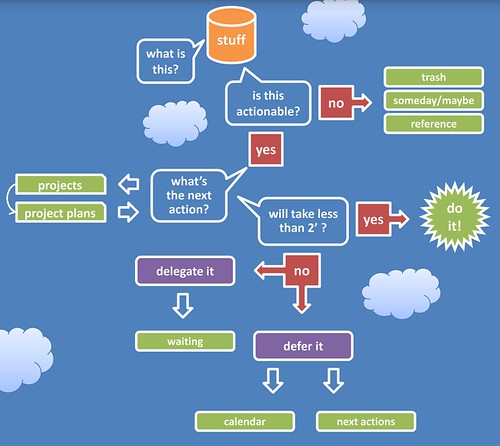
The Getting Things Done workflow will teach you how to deal with everything in your inbox. There are several GTD workflow charts that you can print out to help you learn to process and organize all of the stuff you’ve collected. I put one up on the wall right next to my desk before I even tried to tackle my overflowing inbox. I really like David Allen’s original workflow diagram. The D*I*Y Planner website also has a diagram that I like (especially because it includes some detail on the ubiquitous capture and a checklist for the weekly review).

Currently, I have a desktop wallpaper from anabubula.com on my laptop. Now, every time I open my computer, I see a lovely GTD reference flowchart. Here’s a sample:

Getting Things Done Workflow

Let’s just talk through the GTD workflow using this diagram, shall we?

Every idea, article, appointment request, piece of mail starts out in your inbox.

You pick it up. You ask, “What is this? Is it actionable?”

If it’s not something you can or should act on right now, you have three options - 1) throw it away, 2) save it for future reference (file it), or 3) decide to maybe deal with it some other time (write it on your someday/maybe list or throw it in your tickler file). Literally 75% of my first ubiquitous capture was unactionable. I either threw it away or filed it. Hurray!

If it is actionable, ask yourself, “Can I do this in two minutes or less?“ If you can, do it now (p.s. phone calls usually take more than two minutes if you have to speak with a human being).

If it will take more than two minutes, ask yourself, “Is this a project or a task?“ A task means it will take only one physical action to complete it. A project means it will take two or more physical actions to complete it (look up the phone number and then call - two steps).

If it’s a task write it on your Next Action List.

If it’s a project, write it on your Project List. Then ask, “What’s the next action?“ Write that next action on your Next Action List.

Can you do that Next Action within two minutes? If you can, do it.

If you can’t do that Next Action in less than two minutes, ask, “Am I the best person to do this?“ If you’re not, figure out who is and delegate it. Write a reminder on your Waiting For List.

If you are the best person to do it, ask, “Does this *have* to be done at or by a certain time?“ If the answer is yes, write it on your calendar.

If the answer is no, just leave it on your Next Action List to do whenever you can.

And that’s the GTD Workflow. Now you know how to deal with absolutely everything life throws at you. The process will take a little getting used to on the front end, but after you do it for a while, it will be as natural as toweling off after your morning shower.

—————-

Jay Perry likes to say foreign words that he hears on NPR. Jalalabad! He writes Juggling Sheep, a blog about time management and personal productivity for pastors. Juggling Sheep receives several hits every week by people looking for actual information about how to actually care for actual sheep. Um, no.

Labels: , , ,

Wednesday, March 21, 2007

GTD Quick Start-up Guide

Here’s my quick startup guide to Getting Things Done:


1. Buy David Allen’s Getting Things Done - You will need your own copy. You can’t just check this out from the library and read it once. It will become a reference work that you will go back to several times as you implement and hone your organizational workflow.

2. Set Up a Working Work Area - This means having a trash can, an inbox, a file cabinet, file folders, a labeler, a stapler, scratch paper, binder clips, paper clips, scissors, tape, etc. You will be processing paper. Make sure you are set up to deal well with paper. (Shameless plug: you can buy all of those items at the Juggling Sheep bookstore.)

3. Do a “Ubiquitous Capture” - Capture everything that needs to be processed. This is a daunting and scary project. It means collecting everything in your home or office that needs to be dealt with - books to return or read or throw away, receipts, articles, tapes, DVDs, notes, magazines, board minutes, junk, mail, junkmail, etc. And that’s just the physical stuff. Then you capture everything in your brain (one thought per piece of paper) - ideas, plans, hopes, dreams, unfinished business, appointments, commitments, responsibilities, etc. Put all of these collected things into your “inbox” (note: when I was done with the capture, I literally had two four-foot tall stacks that needed to be processed - 8 feet of junk and stuff and ideas - no wonder I had felt like I was drowning). To read more about my initial ubiquitous capture, click here.

4. Process Your “Inbox” - This is a dauntinger and scarier project. Take everything out of your inbox, one item at a time. Figure out what it is. Decide what to do with it. (I will write more about how to process your inbox later this week.) Eventually it will end up in one of 8 places:

1) Trash
2) Someday/Maybe List
3) Reference (filing cabinet or bookshelf)
4) Project List
5) Project Plan (file or paper)
6) Waiting List (if you’ve delegated it or have to wait for someone else to act)
7) Calendar
8) Contextualized Next Action Lists (the very next physical action for each project)

5. Crank Widgets - Work the system. Keep the appointments on your calendar. Write multi-step projects on your project list. Put next actions on your contextualized next action lists. Do your next actions. Process your inbox every day. Follow up on your “waiting” list. Get Things Done.

6. Do a Full System Review Once a Week - Look at your calendar. Look at your projects and make sure you have a next action for each one. Make sure your next actions are up to date. Do another mini-ubiquitous capture. Empty your brain onto paper again. Do bigger-picture thinking (roles and goals). As a pastor (working toward the weekend), I do my weekly review on Monday.

And those are the very basics of Getting Things Done. It doesn’t need to be complicated. It just needs to be leak-proof so you will learn to trust it. That’s why you quit using every other time management system you’ve ever tried. You didn’t trust it because 1) it didn’t contain everything, 2) you didn’t review it enough to make it leak-proof. Now you know.

Labels: , , ,

Friday, March 9, 2007

Finding/Making Time to Read

A couple of days ago, I posted some book summary sites as a way to get a grip on the volume and breadth of reading a pastor really should be doing.

Calvin writes:
As a 4-month newbie to GTD, I want to ask how do you find time/ make time/ plug
in time to get the reading done you need (even with executive summaries)? It is
my #1 frustration in ministry. (OK, that may be an exaggeration, but it is up
there AMONG the top frustrations in ministry).

Making time for reading is one of those Quadrant 2 things that we're just going to have to intentionally make time for. It's not urgent (it's not screaming at you, begging for attention), but it is important (if you want to continue growing, leading, and thinking).

I used to read 50-70 books a year (not book summaries. books). But then we bought a TV. And then we had kids. And then I started blogging. So now I'm down to about 20 books and 20-40 book summaries per year.

The whole trick to making Q2 work? Make the hard decision up front to replace something less important (American Idol?) or something urgent/not-important (interruptions, junkmail, too-frequent email, phone calls, some meetings, visitation with long-winded members) with something very important (in this case, reading).

I think part of the problem with pastors (in general) is their uncanny ability to spiritualize every part of their job and artificially force it into Quadrants 1 and 2. We really think every phone call might be life or death. We really think we're building the Kingdom of God by letting a church member waste our time with stories about their great aunt Martha. We think there is something innately spiritual about being at everyone's beck and call 24/7. Jesus didn't fall into that trap and neither should we.

In my life, three major Q2 areas stand out - reading, prayer/devotion/spiritual disciplines, and family.

So here are some ways to make time for reading:

1. Calendarize it. Make it an unbreakable appointment on your calendar. Try to do this first thing at work (after devotional time), so all of the emails and phonecalls haven't claimed all of your time yet. If someone needs an appointment with you, schedule it at a different time (you have an appointment then, don't you?). Same thing is true with all Q2s.

2. Make it accountable. Ask someone to keep you accountable on a weekly or monthly basis. You choose the person. Choose what specific things you want them to ask you about - how many books? how long? what genres? what interesting or mind-stretching have you read? what are you reading now? etc.

3. Start/join a reading group. This has been very fruitful for me. I meet with a group of church planters 2X per year. Our meetings are based around a book that we've all been reading as an assignment. So there's 2 books per year that I'm forcing myself to read so I don't look like an idiot. My wife and I set aside time every other week to read a relationship book together and discuss it. Locally, I meet with 2 other pastors every week and discuss a leadership/spiritual growth/preaching book we're all reading.

4. Keep an @reading list. When I wrote down all of my "current" reads in my @reading list, it turned out I was trying to read 8-10 books at the same time. I've since gotten that down to 5 books that I'm keeping open on my list. (1 church planting, 1 relationship, 1 preaching, and 2 others). Minimize the open loops.

5. Take a reading retreat. If you just can't make yourself read at home or work (you probably also can't pray there), take a reading retreat every month or quarter where you blast through 1-3 books over a couple of days.

6. Don't leave home without it. Always keep reading material with you. If you have to sit in the waiting room for 30 minutes, don't waste your time with whatever magazine hapens to be lying around. Read the book or article that you brought (or one that's on your Palm Pilot). If you have to sit outside the changing room while you're shopping with your wife, use the time reading.

That's how I make time to read. What works for you?

Labels: , , , , , , ,

Monday, March 5, 2007

Palm Syncing with Google Calendar

I got a comment on my last post (about having to tweak my calendar so it's no longer a block schedule):
Josue said...

You may want to use Google Calendar. Then set a primary calendar for your hard appointments and a secondary one for your blocks. They can be given different colors and you can hide or highlight them very easily at any time.

GTD is cool :) I just started implementing it 2 weeks ago and it has changed my work flow in an amazing way!

1. Way to go, Josue! Keep using GTD. The first month may be the hardest. But if you focus on the amazing results you're seeing, you will never want to go back!

2. But I use a Palm Pilot. And in searching online, I've only seen nasty, ugly, roundabout hacks to get Google Calendars to sync with a Palm Pilot. Most of them involve iCal, which I don't use because I used to have Palm Pilot and iCal syncing issues.

...

So this evening, my wife and I were enjoying some idle conversation, when I wistfully proclaimed, "I wish there were some good way to sync my Palm Pilot with Google Calendars. I got this great comment today... And I can have multiple calendars with one as my block schedule and one as my appointment calendar..."

My wife said, "Did you even check your del.icio.us links today?!"

Lo and behold! There it was. A link from my lovely wife to goosync.com. And it looks like it actually will sync my Palm Pilot with Google Calendar! There's a free version and a subscription version. I'll have to see how well I like the free version before I go throwing money at anything.

I'll let you know what I come up with.

I'm not really tied to MSOutlook anyway, because I'm only a MSWindows person at work. And my work situation is changing... And I really doubt I'll ever have to use a PC again. Am I rambling?

P.S. Thanks for the tip, Josue! Thanks for the heads up, wife.

P.P.S. Did everyone else already know that you could sync Google Calendars with a Palm Pilot? Am I the last one to know these things?

Labels: , , , ,

Saturday, March 3, 2007

First Big GTD System Tweak in Months

So I'm now on my second readthrough of David Allen's Getting Things Done. Thursday night I read on page 41 (also repeated on page 143):
The way I look at it, the calendar should be sacred territory. If you write something there, it must get done that day or not at all.

When I first started using GTD, I set up my Outlook Calendar to look like my office schedule. So my entire calendar consisted of larger blocks of time dedicated to one or two major work themes. My block schedule (see a sample or download the MSWord doc) has been a great way for me to remember major, recurring roles and goals.

But when I read that the calendar should be "sacred territory" and that calendarized items HAD to happen on the day and that my brain was probably taking back the job of reminding me because I had so many unnecessary things on my calendar... I had to change it.

Truthfully, I had started ignoring my calendar because it was so cluttered. Every day looked almost like the one before - the same big chunks of half-important stuff to do. The only way I differentiated between "hard" appointments and "soft" time blocks was that I would set the alarm for "hard" appointments.

I'm having a little bit of a hard time adjusting. This means that I will have to keep my block schedule on a printout somewhere in view. Friday, for instance, I didn't leave the office on time, because I had deleted the big 6-hour block that was "Personal Time." I think I may put an alarmed reminder back in, but it won't be the whole big block.

But this change also means that I will probably start using my calendar more effectively and trust my system even better than before.

Let the tweaking begin. Wish me luck.

Labels: , , ,

Thursday, March 1, 2007

Enforcing Your Schedule

Last time I was getting my hair cut, the stylist was talking (I think it's part of their formal training) about my family and my job and what I do, blablabla. And she said, "Oh, I could never be a pastor. Being on call like that all the time..."

I've heard that sentiment quite a bit. I think pastors are only on call 24/7 when they allow themselves to be on call 24/7.

Does this stylist really think she can call and get in touch with her pastor at 3am? And does she think her pastor will actually do something for her at 3am? Maybe if her pastor is some weird, codependent, people-pleasing, enabler with no sense of boundaries...

Just a couple of personal stories:
I had a member call around midnight once. The ringing woke me up (I had been in bed two or three hours already). I looked at the caller-id and saw it wasn't a family member. So I went back to sleep. I called the man back around 5:30am. I said, "I noticed on my caller-id that you called me last night. It must have been really important for you to call so late. So I'm returning your phone call." The man could hardly talk, he was so sleepy. And he never tried to call me late again. (That's me being a little passive-aggressive.)

A family transferred to Cornerstone from a different church. They are very active members with lots of energy and ideas. Unfortunately, those ideas seemed to desperately require my input every Sunday (my day off). Sometimes multiple times on Sunday. This went on for about three weeks [note to self: passive-aggressive behavior doesn't work with some people]. Finally, one Sunday when they called, I just said, "Look. Sunday is my day off and I'm trying to spend it with my family and not think about work (because a big part of the pastor's job is thinking). I'm excited that you have all these ideas, but if you need to get in touch with me, I'm available during the week. Please don't call me on Sunday unless you're dying." They seemed a little hurt and brought it up twice over the next couple of months, but they have never called me again on my day off.
Top 5 Ways to Enforce Your Schedule:
  1. Publish your work schedule. Write it out on a chart. Put it on the church office door. Send it out to all the members. Give it to all the new and potential members in your Membership Class. When it changes, send a new one out to the members, so they'll have an updated copy. Download my most recent.
  2. Don't publish your home phone number. Not even in the church directory. If you really think people may need to get in touch with you during non-office hours, get a cell phone. When you don't want to take business calls, just turn your cell phone off. Your spouse doesn't need to become your de facto secretary, constantly telling people to call you at the office or taking your messages.
  3. Make exceptions truly exceptional. If someone is dying, break your schedule. Otherwise, keep it intact.
  4. Be direct about your boundaries. Tell your church that they can't get in touch with you on date night. Tell people what you will and won't do. Tell them you're only willing to work 40 hours a week. If you don't tell them, they won't know.
  5. Quit micromanaging. For the most part, let your church members make their best decisions and let it go. If you have to control everything and make yourself indispensable, people won't be able to make a move without your personal blessing. If you have created that pastor-dependent culture, it's your own fault when people are hounding you for input 24/7.
Some links to previous articles:

Labels: , , , , , ,